Rayyan H

Build Mode
Build mode is developed by the joint effort of both me and the programmers who developed the framework in C++. I also had a hand in the C++ development when I needed to adjust their framework to fit the current needs of the game design. It was the most complicated one due to the changing needs and the fact it acted as the core gameplay loop so it needed to be iterated frequently.
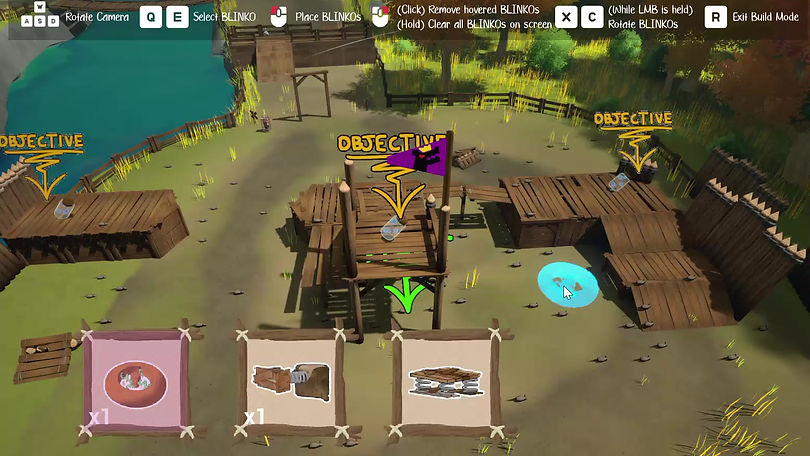
In the video above, I handled the logic of the UI providing the appropriate BLINKOs (the structures placed down) as well as the logic for having the player interact with the fort for this to happen. Using a mix of C++ and Blueprint, I was able to provide a building system, a resetting system, an objective system, and the logic necessary to clean up the fort upon completion. Below I describe the breakdown of how player input is received and applied to the building.

Tracing Mouse Position
When the input action move cursor receives input data (via joystick), it will take the value as a delta to move the cursor along the screen which will act as the placement position for the BLINKOs. The macro Get New Location and Clamp clamps the cursor's position based on the viewport to avoid going off screen.

Moving the cursor
During possession of a builder pawn, a tick function is called that will update the cursor's position based on a condition. If the player is moving a mouse, it will follow the mouse's position for the cursor, but if the player is using the joysticks, it will move based on the player's joystick input. While in Keyboard and Mouse mode, the cursor's current position is tracked so that if the player were to swap to controller at any point, it would not snap to the last known position of the controller.
When the player stops possessing the builder pawn, this tick function stops ticking.

Retrieving Location Data with Virtual Cursor
When the place button has been pressed, an auxiliary function is called inside the preview actor from the builder pawn via chain of command pattern that will spawn the BLINKO with a bunch of parameters. The base function was made by the programmers but I appended to it the tag addition upon spawning the BLINKO to help separate the BLINKO by pre-placed versus dynamically placed without relying on casting to reach for any specific boolean. Internally, the player placed bool is also set

Update Preview Actor/Place BLINKOs in C++
The location set up is simple but for the preview rotation, it will receive the hit normal passed in and create a rotation from the hit result. From what I have researched, the function MakeRotFromZX takes in the Z and X axes passed in (Hit Normal for Z axis and the preview actor's forward vector for X axis) and calculate a Y based value for the rotator. I then takes the preview actor's local yaw (aka the rotation direction that you get when you spin a carousel for example) so that when the BLINKO rotates to the surface normal, the original yaw from the player input is respected.